Showing posts with label tricks. Show all posts

How To Get Free Pluralsight Subscription for 3 months

How To Get Premium Pluralsight Account For Free


Before sharing the trick, I would like to tell you something about Pluralsight.

Pluralsight is one of the best online website to learn programming through videos. It is a private online education company that provides a huge variety of online video tutorials for beginners as well as professionals to enhance their coding skills.


Pluralsight provides video tutorials for almost all the programming languages including Angular.js, php, java, javascript and all the other languages. You can see the list of all Pluralsight courses here

You may also like : How to use Whatsapp new font in chat

Also, in order to get access to these video tutorials, pluralsight subscription costs $29 for one month and $299 for a year which is a huge amount for students.

 But you don't have to worry about this, we at Tech Jugaad are going to share a trick to access the whole Pluralsight videos at free of cost and that too for three months.

That means you will be provided all the premium account facility that includes access to
                       - entire 5,000+ course library,  
                       - Mobile apps
                       - Exercise files
                       - Completion certificates 
                       - Offline viewing and many more features

So you don't have to search for Pluralsight Video downloader or any other illegal method to watch tutorials. You will also get access to Pluralsight Mobile App. So, just follow the below steps to get the free Subscription.

Steps to Activate Free Pluralsight Subscription

1.   Create a Microsoft live account from here. You can skip this step if you already have one.
2.   Now, go to my.visualstudio.com and sign-in with your Microsoft live id which you created at first step.
3.   It will take you to Visual Studio Dev Essentials page with number of subscriptions and tool displayed on the page.
4.   Here Choose Pluralsight (3 months subscription) among the other benefits and click on Get Code.
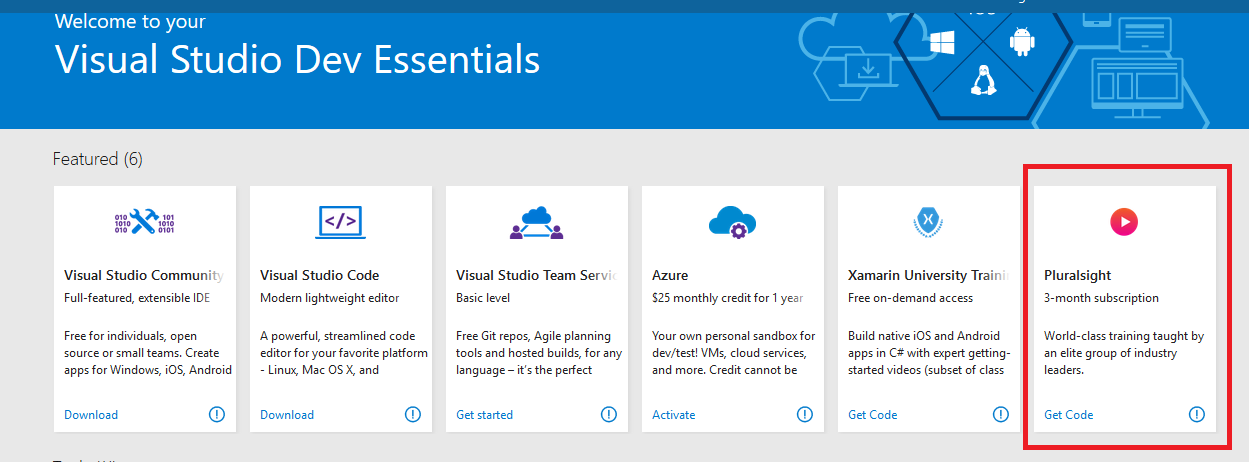
Get Pluralsight premium subscription for free
 
5.   After that, you will be taken to the Pluralsight website to activate and redeem your 3 month subscription.

6.  It will take you to the page where you have to enter the your information. Just enter all the required information and click on “Activate Benefit”

Pluralsight sign up

That's it !! Enjoy the free subscription and take your coding skills to next level.

You can also try other subscriptions provided over there. Visual Studio Dev Essentials provides many essential tools for developers like Visual Studio Code, MS SQL Server and so on.

Final Words

This trick is perfectly tested by us before sharing it with you. I would personally suggest you to take advantage of this opportunity. There are a number of programming languages existing in the programming world and each one of the them has huge demand in the various Organizations. So pick your favorite language and get excel in it.

Also Check : Get Direct Download Link For Movies

I hope you liked the article. Do share this article with your friends. Keep Visiting !!

How To Use Secret Conversation In Facebook Messenger

How to Send Secret Messages from Fb Messenger


How to use Private Chat in Messenger


Like Whatsapp, Facebook has rolled out new update called Secret conversation that supports end-to-end encryption. This update ensures that no one can read the messages between you and your recipient not even the company and the government will be able to spy on your messages.

Facebook introduced this feature first in July, 2016 in beta app that was applicable to limited people but now it has started rolling out this update for all its users.

Facebook has provided better privacy and security options with this update. You can send auto-destructive messages, can verify the encryption with the help of the device key.

Secret Conversation feature is currently available in iOS and android's messenger app. It is not available on www.facebook.com or www.messenger.com.


How to Enable Secret Conversation on Facebook Messenger :

Follow the below steps in order to enable this feature :

1. Open Facebook messenger app.

2. Move to your Profile section.

3. Tap on secret Conversations and enable the Secret Conversations from there.

Secret Conversation in Facebook MessengerPrivate Chat feature in Facebook Messenger


If you disable Secret Conversations, your existing secret messages will remain on the device until you delete them, but you’ll no longer be able to send or receive them or start new Secret Conversations.

4. Choose the contact you want to start a secret chat with.

5. Tap on (i) icon beside their name on the top right corner and from there choose Secret Conversation option. The screen will turn to a black theme.

Facebook End-to-End UpdateHow to enable secret chat in messenger


6. Type the message you want and send it. That's it

After you send an encrypted message, the recipient will have to agree to use the Secret Conversations feature. Once they do, they will be able to see your message.

You may also Like : How to Get Pluralsight free subscription.

How to send self destructive messages from messenger

With this new feature, you can send self-destructive messages through messenger.
To send auto destructive messages, follow the below steps :

1. Open messenger and start Secret Conversation as described in above steps.

2. Tap on the Timer button and set the Timer for how long you want the message to remain visible after being seen.

How to Send Auto-Destructive messages in facebook messenger

3. After that type the message and send it.

You can set timer on the messages also. After setting the timer, your message will disappear from the chat after that much time you set.

What you can send in Secret Conversations

This feature works almost like the normal Facebook messages but there is some restrictions in the Secret Chat feature. You cannot send gifs, videos, voice call in secret conversation. Also, the payment feature is also not supported.


Final Words

So this was all about the Facebook's new Encryption update. This update has secured the privacy of the users and users are going to like it obviously. if you have not got this feature in your app, update your app once. The best part is that your chats will be deleted after 24 hours automatically.
If you liked this article, please share this among your friends. Thanks for visiting Tech Jugaad
 

How To Create Unlimited Gmail Id's With Just One Gmail Account | Gmail Dot Trick

How To Create Gmail Multiple Accounts


Most of the users now-a-days, create many email id's in order to avail discounts on various sites, be it Amazon, Freecharge, Ola and so on. So they have to remember all the mail id's alongwith the passwords and that becomes a headache for the user to create multiple mail id's first and then remember them.

Create Unlimited Gmail Accounts

So here, I am going to explain a trick which can reduce this overhead for creating multiple gmail id's.
By using this trick, you will be able to create many valid gmail accounts that too with a single gmail id. People have given name to this trick as Gmail Dot Trick.

Also Check this out : How to get direct download link for any movie

Steps To Use Gmail Dot Trick :


1. First and foremost step is you must have one gmail account with you.

2. Suppose you are having gmail id with name -
    tempname120@gmail.com

    now, you have to use dot(.) in between your gmail ids to make multiple accounts.

For example :

t.empname120@gmail.com or

te.mpname120@gmail.com or

tem.pname120@gmail.com or

temp.name120@gmail.com or

tempn.ame120@gmail.com or

tempna.me120@gmail.com or

tempnam.e120@gmail.com or

tempname.120@gmail.com or

tempname1.20@gmail.com or

tempname12.0@gmail.com


This is because according to Google policy, placing dot(.) in your gmail id doesn't matter and your gmail id will be considered as same to original one.
So if someone send you mail on anyone of the above gmail ids, then you will receive it on your original id i.e
tempname120@gmail.com

3. That's it, you're done. You can make several ids with just one account in this way.


Create Multiple Gmail Account With Gmail Account Generator Tool

If you don't want to create accounts manually, here is a tool which will do the same work for you   without any manual work. you just have to enter your gmail id's and the tool will do the rest of the work for you.

Follow the steps given below :
  • Firstly, Go to Gmail Dot Trick Generator tool from Here.
  • Now Enter your gmail address in the Username text box and click on Generate.
  • A list with many Gmail id's will get displayed. Just click on save button and a notepad file will be downloaded into your system.
  • Now you can use these gmail ids to create different accounts on same websites or any other different purpose

Conclusion

So this was the simple trick to generate multiple Gmail accounts with just one Gmail account.Most of the people know this trick and are already using this trick to generate various email accounts.So if you have not used this trick, I suggest you to please try this at least once. If you have any questions, you can always ask in comments below.

Also Read : How to get premium Pluralsight subscription for free

If you liked this article, you can share this with your friends.

Thanks for Passing by and keep visiting for such amazing tricks.

Download Movie Subtitles Automatically in VLC Media Player

Download Subtitles Automatically in VLC

Getting the Subtitles for your movies is not a difficult task today. You just have to google with movie name and search result will display plenty of websites offering the Subtitles.
But wouldn't that be awesome if you get subtitles automatically in your media player??

Luckily, VLC Media Player can do that for you!

VLC is overloaded with lots of features and it is one of the best open source media player. VLC supports different plugins and add-ons. So you need to download one plugin called VLSub to get subtitles for your movies. VLsub is one of the high rated plugin for vlc which allows you to download the subtitles with just one click.

Also Check here : How To Use VLC Media Player Like A Pro

How VLsub Works

The VLsub actually uses Opensubtitles.org to fetch the requested subtitles.
VLsub plugin searches for the subtitles and then displays the matching subtitle files, so you can choose anyone and download it immediately and after that automatically loads the subtitles into the movie.

How To Download Free Subtitles Automatically using VLsub

Follw the below steps to use VLsub in VLC

     1: Download VLsub from the here and extract the compressed file.

     2: Copy the VLsub.lua file and paste it in the following directory on windows:
          C:\Program Files\VideoLAN\VLC\lua\extensions.
          For Linux : ~/.local/share/vlc/lua/extensions/
       
How to download free subtitles in vlc media player


     3: Now, Open VLC media player and click on View and you will see VLsub there.

download free movie subtitles in vlc automatically

     4: Play your movie now and click on VLsub.

     5: VLsub window will open up, type the name of the movie and click on Search by Name/Hash. Wait for a few seconds and a list of available subtitles will appear.

download free movie subtitles using vlsub


     6: Select a subtitle and click on the Download Selection button to download the subtitle.

Subtitles will get automatically loaded in the movie. Enjoyyy!!


Final Words

So This was all about downloading free subtitles automatically in VLC media player. If you are facing any kind of difficulty while installing this plugin, do let us know in the comments.
Hope you have enjoyed reading this article. Do share this post if you liked it.
Keep visiting !!